

BenQ GW2780 27 Inch 1080p Eye Care LED IPS Monitor, Anti-Glare, HDMI, B.I. Sensor for Home Office
- Full HD display image quality with 1920 x 1080 resolution
- Wide viewing angle IPS panel
- Edge to edge slim bezel design
- Brightness Intelligence technology
- Cable management system


BenQ GW2780 27 Inch 1080p Eye Care LED IPS Monitor, Anti-Glare, HDMI, B.I. Sensor for Home Office
£39.99
Description
BenQ GW2780 27 Inch 1080p Eye Care LED IPS Monitor,

BenQ GW2780E 27 inch Widescreen IPS LED Monitor inc. stand, cables, docs & box
Condition: Used
in stock
£45.00


£90.00
£39.99
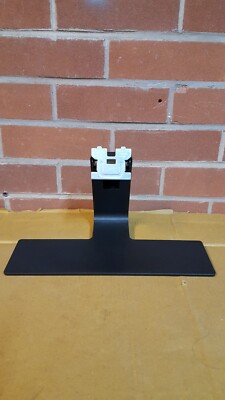
Replacement Stand for BenQ GW2780T, GW2480, GW2280, GW2283 Computer Monitor
Condition: Used
in stock
£39.99
Additional information
Specification: BenQ GW2780 27 Inch 1080p Eye Care LED IPS Monitor, Anti-Glare, HDMI, B.I. Sensor for Home Office
| Drone General | ||||||||||||||||||||||||||||
|---|---|---|---|---|---|---|---|---|---|---|---|---|---|---|---|---|---|---|---|---|---|---|---|---|---|---|---|---|
|
||||||||||||||||||||||||||||
| Display | ||||||||||||||||||||||||||||
|
||||||||||||||||||||||||||||
| Specification | ||||||||||||||||||||||||||||
|
||||||||||||||||||||||||||||
Price History
-
Reviews (3)
3 reviews for BenQ GW2780 27 Inch 1080p Eye Care LED IPS Monitor, Anti-Glare, HDMI, B.I. Sensor for Home Office
Show all
Most Helpful
Highest Rating
Lowest Rating


Amazonian-001 –
Firstly, I’ve previously purchased and returned x2 PG279QR IPS ASUS monitors, and I’ve also returned a PG278QR TN Panel ASUS monitor because the quality control is so poor imo. They both cost well above £500. The IPS on those panels had terrible backlight bleeding, and the high refresh rate and G-Sync still didn’t justify the price. I decided to settle for this. A sub -£200 24 inch IPS monitor in the meantime, and I’m so glad I did. I’m so impressed! I’ve overclocked it to 84hz on my 1080ti to make things a little smoother, and the screen is beautiful to look at. For £119 it has the tiniest of back light bleed on the top left, it’s not even noticeable check my pictures. On previous expensive monitors back-light bleeding is a terrible eye sore it ruined everything good.
I have 2 small cons, and they aren’t even big. The screen could be a tiny bit brighter, so that during bright summer days it stands out a bit more. But it’s perfect in the dark and again not even really an issue. And…
Yeet Yeetington –
Upon unboxing, the screen looked very washed out, similar to changing the white balance on a camera to +5. After playing around with the settings, the monitor is perfect for the price!
So that the picture settings aren’t greyed out, go to: Picture Advanced > Picture Mode > User
The following settings I have used are:
Picture Advanced > HDMI RGB PC Range > RGB 16~235
Picture > Gamma > 5
Amazondexter –
I’ve been using this monitor for more than a month now and I like it. Bought it for 125 quid as a secondary monitor to my old TN monitor BenQ GL2450HM which help me in my job as a web developer. Overall, it’s a good value for money.
Pros:
1. Bezels are very slim.
2. Very good image quality.
3. Screen is matte and not glossy.
4. Provides a good image quality even when using D-Sub (aka VGA) cable. Using HDMI makes the image even sharper.
5. Power consumption is very low.
6. Do not get hot.
7. Comes with two cables: D-Sub (aka VGA) cable and HDMI cable, which is very handy because my hp laptop has a VGA port and a HDMI port and I use them to connect the two monitors without any extra devices.
8. Has a VESA mount which makes it easy to use a monitor desk mount.
Cons:
1. You have to choose the video input HDMI/VGA manually which is quite frustrating when you don’t know this when you first buy it. In an Older TN model BenQ GL2450HM that I use, the video input is selected automatically which is a…